


You open Google Search Console. The impressions graph is climbing. Your website is finally appearing in search results. Then you look at the clicks: almost nothing has changed.
It is tempting to rewrite every title or publish more posts. First, find out which searches are showing your pages. You may be appearing too far down the results, answering a different question, or giving people little reason to open your page.
Here is how to find the difference and choose one useful change. We will use a made-up appointment-reminder business as an example throughout.
What impressions and clicks actually tell you
An impression means Google counted an appearance of a link to your site. It does not mean someone read the page or even paid attention to the result. A click means someone followed a link from Google to your site.
Click-through rate, or CTR, is the share of impressions that led to a click. If a result gets 1,000 impressions and 5 clicks, its CTR is 0.5%.
The fourth useful number is average position: an average of where your result appeared across the searches in the report. It is not a fixed place everyone sees. Google explains these measurements in its guide to impressions, clicks and position.
A low CTR needs context. Five clicks from a result usually far down the list tells a different story from five clicks near the top. There is no single percentage that every website should aim for.
Start with one page and its searches
Open Search Console's search Performance report and choose a useful date range. Compare the last 28 days with the previous 28. For a small site, use a longer period so you have more than a handful of appearances to examine.
Then:
- Turn on clicks, impressions, average CTR and average position.
- Open Pages and choose an important page with impressions but few clicks.
- Open Queries to see the words people searched for when that page appeared.
- Pick a search that relates to something your business actually helps with.
When comparing changes, keep the country, device and search type consistent where those filters matter. Google's Performance report guide explains how to examine a page and its searches.
You can also do the page review in SEO Dispatcher. Connect the matching Search Console property, open Search Insights, and use the Performance view. Choose the page view, then click a page URL to see its search queries, clicks, impressions and average positions for the selected period.
That gives you a starting point: a page, a search, and a question to investigate.
Look for the searches that belong to your business
Imagine our reminder business has a guide about reducing missed appointments. Its page report contains these invented figures:
| Search | Impressions | Clicks | Average position |
|---|---|---|---|
| how to reduce missed appointments | 1,800 | 9 | 9.4 |
| appointment reminder email template | 700 | 3 | 8.1 |
| free printable calendar | 4,000 | 0 | 46.0 |
The calendar phrase has the most impressions. It is also the weakest fit. Those people want something the business does not offer, and the page usually appears far down the results for it.
The first two searches deserve a closer look. They describe problems a reminder business can help solve.
Read your own rows this way. Ask, “Could we help this person, and does this page give them what they came for?” Avoid turning every high-impression phrase into a new article. Our Search Console topic guide explains how to check whether an existing page already covers a question.
Check what the person expects to find
Search the relevant phrase yourself, using the country and device you care about. Treat this as a look at the current results, since your own search will not reproduce every appearance in the report.
For “appointment reminder email template,” look at the pages people can choose. Do they offer ready-to-copy messages? Does your page only explain why reminders matter?
If so, a reader might reasonably choose another result. An exciting headline will not make an explanation into a usable template.
For “how to reduce missed appointments,” the existing guide might be the right page. Read its opening. Does it give the owner something to do today? It could explain when to send a reminder, how a customer can cancel, and what to say after a missed booking. Add a sample message where it helps.
Use the SEO audit in SEO Dispatcher to review the page's available content and search evidence. Check a recommendation against the actual page, then decide whether to improve it or create a separate answer. The distinction is the reader's task, not a slightly different spelling of the keyword.
Give the search result a clear promise
Once the page answers the right question, read its title and description.
Suppose the title is “Better Business Through Better Scheduling.” A clearer title for our guide would be “How to Reduce Missed Appointments: Reminders and Follow-Up.” It tells the reader what help is inside.
The short description could say:
Learn when to send appointment reminders, make cancellations easier, and follow up after a missed booking. Includes a sample reminder message.
Only promise the sample if the page includes it. Use the words your reader uses, without repeating the same phrase in every sentence.
Google may choose different wording for the displayed title or description. Your edits still help make the page's purpose clear. Our title and description guide has more examples.
What if the answer is already on Google?
Sometimes a person can get enough information from the search results themselves. They might see a short answer, a calculator, or an AI Overview, which is Google's AI-generated summary.
Look at the results for your important searches before assuming this caused the missing clicks. Your impressions and CTR alone cannot prove it. Google's AI features guidance explains how those experiences work.
Ask what a reader would still need from your page. For our reminder business, it could be a message they can adapt, screenshots showing the setup, or an explanation of how customers change a booking. Provide that help when it belongs to the topic. Do not add unrelated sections just to make the page longer.
Make one useful update, then check it
On Overview, SEO Dispatcher's Quick wins panel is headed Almost on page one. It highlights pages with search impressions and average positions between 8 and 20. Use it to find a page worth investigating; a place on the list does not promise that one edit will move it up.
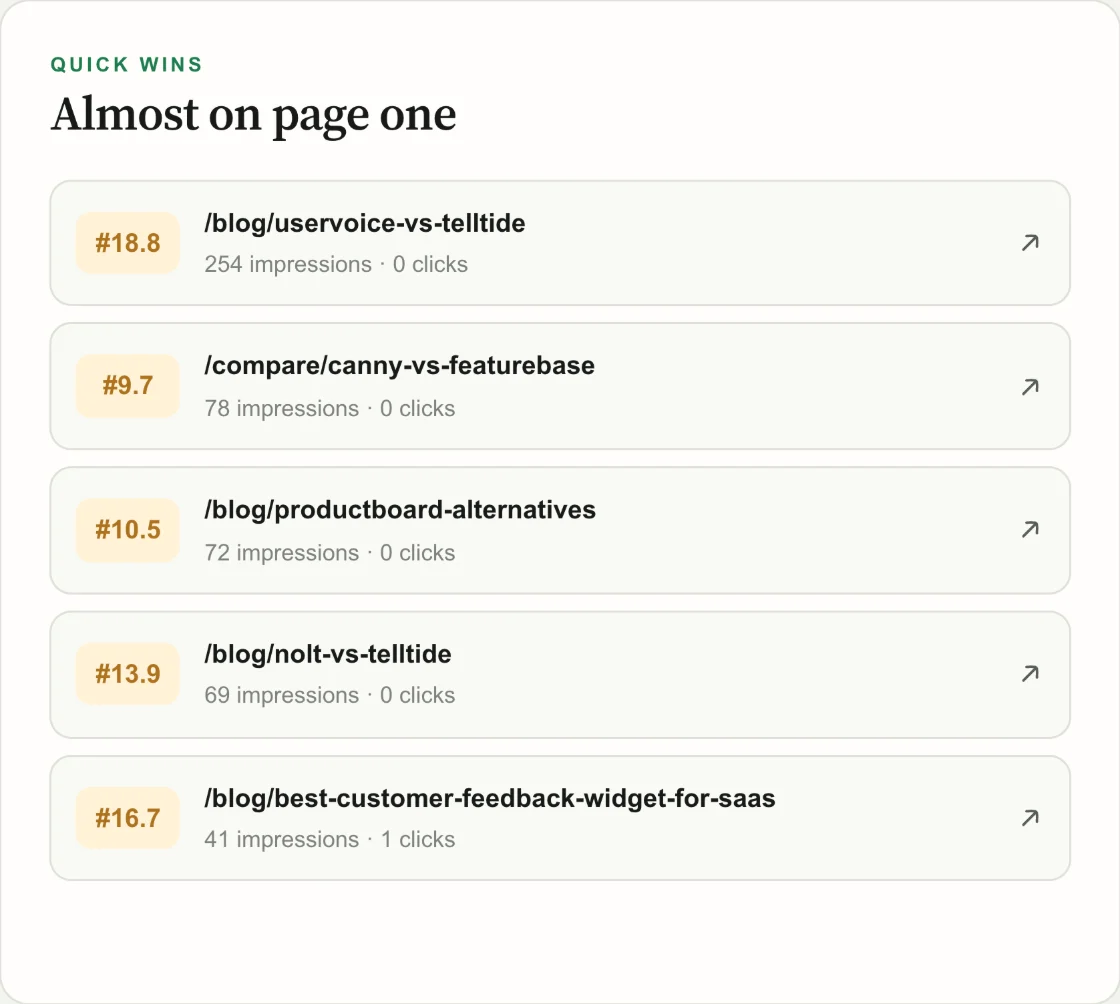
A saved product screen from TellTide's workspace. Your connected website supplies the figures in your own report.
Once you have chosen an article, give the editor a small, clear request:
Improve our missed-appointments guide for a small business owner. Put practical steps near the start. Add a sample reminder email and explain how to adapt it. Use our real product details. Keep the current page address and remove any promises we cannot support.
SEO Dispatcher can help prepare and review that update. For a connected Markdown or MDX blog, send the approved file through GitHub and check the page after your website deploys it. Changes to a separate product page may need your website builder or developer.
Write down what changed and when it went live. You can save this in Search notes in SEO Dispatcher. After Google has had time to revisit the page and enough new data has collected, compare the same page and searches over similar periods. Check relevant clicks alongside impressions and positions. With very small numbers, wait for more evidence before calling the change a success.
If clicks improve, check whether the visitors also take a useful next step, such as viewing the product or starting a trial. Our guide to measuring SEO results covers that part.
Start with one page you can make more helpful. That is a manageable next step when the graph looks encouraging but the click count does not.